The Free Pitch Calling App for Baseball & Softball (2026): What You Get, How to Set It Up, What It Costs
Yes, there is a genuinely free pitch calling app. MAVTRAX runs on iPhone, Android and the web with no subscription, no plan tiers and no in-app purchases. This page is the honest download page: exactly what the free app does, the 15-minute setup with a ~$15 helmet headset, how the cost compares with a $999 the hardware kit® kit, which teams it fits, what to check with your league, and the limits we would rather you hear from us.
In this guide · 10 sections
- Gear for this
- What does "free" actually mean here?
- What exactly do you get in the free app?
- How do you set it up in 15 minutes?
- What does it cost compared with the hardware kit and wristband cards?
- Who is the free pitch calling app for?
- Is a pitch calling app legal in your league?
- How do you run your first game with it?
- What are the honest limits?
- FAQ
Key takeaways
- MAVTRAX is 100% free with no subscription on iPhone (App Store), Android (Google Play) and the web. There are no plan tiers, no trial clock and nothing to unlock. We make money from the gear guides on this site, not from the app.
- The free app is the whole app: tap a pitch type plus a location, the catcher hears a spoken call in under 1 second, press and hold Live Talk to speak in real time, and it all works offline once loaded.
- Total hardware spend is about $15: a motorcycle-helmet Bluetooth headset wired into the catcher's helmet. The $999 hardware starter kit is $999 direct as of Aug 2026.
- Setup takes about 15 minutes the first time: download, pair the headset, velcro the speaker pod inside the ear flap, and run a yard test from 60 feet.
- It is one-way, coach to catcher. The pitcher wears nothing and gets the call from the catcher with one simple sign. Confirm one-way devices with your own governing body before game day; rules differ by league and state.
- Best fit is 9U travel through high school and fastpitch 10U to 18U, anywhere the coach already calls pitches and the team has lost innings to stolen or missed signs.
Yes: MAVTRAX is a 100% free pitch calling app with no subscription, and it runs on iPhone, Android and any web browser. A coach taps the pitch type and location on a phone in the dugout, and the catcher hears the call spoken into a Bluetooth headset in under a second. No wristband cards, no finger signs for the other dugout to decode, no $999 hardware kit. Download it free and the only thing left to buy is a ~$15 headset for the catcher's helmet.
That sentence is the answer most coaches are searching for, so we put it first. The rest of this page is the download page written honestly: what "free" actually means here (and how we pay for it), exactly what you get, the setup, the cost table against the hardware kit and wristband cards, who it fits by age level, what to check with your league, a first-game playbook, and the limits. If you want the wider category overview, that lives in our pitch calling app guide; if you want everything about the hardware system itself, that is the electronic pitch-calling guide. This page is for the coach who already knows what a pitch calling app is and wants the free one working by the weekend.
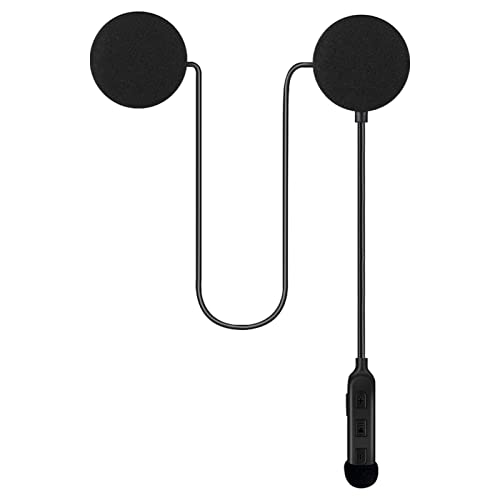
The headset that makes it work
Every setup above ends in the catcher's helmet. These are the helmet-mount units we recommend, from our headset guide (install in 5 minutes: how-to). Live price on Amazon.



What does "free" actually mean here?
Free means the entire app costs $0, today and next season, with no plan tiers, no trial clock, no in-app purchases and no feature wall. There are exactly zero paid features in MAVTRAX. Every pitch type, every location, Live Talk, offline mode, the roster and the pitch log are all in the free app because the free app is the only app.
Coaches are right to be suspicious of that word. "Free" in the app stores usually means one of four things: a trial that flips to a monthly charge, a crippled version that unlocks the useful buttons for money, an app that sells your roster data, or an app that is free because it has been abandoned. MAVTRAX is none of those, so here is how it is paid for instead.
This site makes its money from gear guides. When a coach reads our best Bluetooth headsets for catchers guide or our catchers helmet roundup and buys through an Amazon link, we earn a small commission at no cost to the buyer. That is the business. It pays for the app, the audio, the servers and the writing, and it means we never have to put a paywall between your catcher and the next pitch call. It also keeps us honest in a way a subscription never would: the guides only earn if they are actually useful to coaches, so we write them carefully.
Two specifics worth stating plainly. First, you never enter a card number anywhere in MAVTRAX. There is no checkout, so there is nothing to forget to cancel in October. Second, the app does not sell or share roster data. A pitch log is useful to exactly one person, the coach who called the pitches, and it stays with that coach.
What exactly do you get in the free app?
You get a complete one-way pitch-calling system: pitch type plus location, spoken to the catcher in under 1 second, with Live Talk and full offline operation. Nothing is held back for a paid tier, so this list is the whole feature set.
Tap the pitch and the location. The calling screen shows the pitcher's arsenal (fastball, curveball, slider, changeup, and for fastpitch rise, drop, screwball and more) alongside a location grid. Tap a pitch, tap a spot, and the call goes. If you are still building a young pitcher's mix, our pitch types by age guide covers what belongs in a 10U arsenal versus a 14U one, and pitch locations explained covers the vocabulary the catcher will hear.
A spoken call in under a second. The catcher hears "Curveball, low and away" as a clear recorded voice, not a beep code and not a number to look up. The audio is pre-recorded and stored on the phone, which is why it is fast: nothing streams, nothing buffers, nothing waits on a cell tower.
Live Talk, press and hold. Hold the TALK button and your live voice streams from the phone microphone to the same headset in the catcher's helmet. Use it for the things a pitch menu cannot say: "pitch-out if he breaks early," "throw through to second," "settle him down, one pitch at a time." No extra hardware, same headset, same connection.
Works offline once loaded. Open the app once with signal and the pitch audio is cached on the device. After that, the back field at a tournament complex with zero bars behaves exactly like the front field with full bars. Bluetooth between the phone and the headset does not need the internet at all.
One-way, coach to catcher. The pitcher wears nothing. The catcher hears the call, then gives the pitcher one simple sign. This is deliberate: it is the configuration most governing bodies that allow electronic communication permit, and it keeps the pitcher's routine untouched. Do pitchers wear earpieces? covers why the pitcher stays unwired.
Roster and pitch log. Add pitchers, set each one's arsenal so you never call a pitch a kid does not throw, and let the app log every call by type and location. Pair it with your league's pitch count rules and you have an honest count without a clipboard.
iPhone, Android and web. The App Store and Google Play builds are native apps; the web app at mavtrax.com/app runs in a browser on anything with Bluetooth, including a laptop in the dugout. The same account works on all three.
How do you set it up in 15 minutes?
The first-time setup is four steps and about 15 minutes; every game after that is a 30-second pairing check. Here is the sequence in the order that avoids the common mistakes.
- Download the app (2 minutes). Get MAVTRAX free on the App Store for iPhone or Google Play for Android, or open the web app in a browser. Create the account, add one pitcher and their arsenal. That is enough for the yard test; add the rest of the staff later.
- Pair the headset (3 minutes). The recommended headset is a ~$15 motorcycle-helmet Bluetooth headset, the kind riders velcro into a helmet liner. Charge it, hold the power button until it announces pairing, and connect it in your phone's Bluetooth settings just like earbuds. Our headset guide lists the models that fit inside a catcher's helmet, from $13 pods to brand-name ski-helmet speakers. Budget picks in the $13 to $20 range do the job for most teams.
- Wire it into the helmet (5 minutes). This is the step that makes the whole system feel professional. The thin speaker pod velcros to the inside of the helmet's ear flap, the wire runs along the padding to the control unit on the back or side of the shell, and nothing touches the catcher's ear directly. Because the speaker is part of the helmet, it stays put when the catcher rips the helmet off on a pop-up and nothing needs re-seating. The full walkthrough with photos is in how to install a Bluetooth headset in a catcher's helmet.
- Test in the yard (5 minutes). Put the helmet on your catcher, walk 60 feet away with the phone in your pocket, and call ten pitches. You are checking three things: the volume is loud enough to hear over a crowd but not painful, the call arrives before you have finished lowering your thumb, and the catcher can repeat the call back exactly. Then walk to 90 feet and repeat, because dugout-to-plate is farther than it looks. Adjust volume on the headset, not the phone, so it stays put.
Two setup habits that pay off all season. Charge the headset the night before every game; most ~$15 units run 6 to 8 hours per charge in our reading of their listings, but a dead battery in the fourth inning is the most common failure and it is entirely avoidable. And name the headset something obvious in your phone's Bluetooth menu ("CATCHER 1") so you never accidentally pair to the car.
What does it cost compared with the hardware kit and wristband cards?
The free app plus a ~$15 headset is the cheapest working electronic pitch-calling setup by a wide margin; the $999 hardware starter kit is $999 direct as of Aug 2026, and wristband cards are cheap but slow and readable. Here is the honest three-way comparison a coach actually makes.
| Setup | Up-front cost | What you get |
|---|---|---|
| MAVTRAX + helmet headset | $0 app + ~$15 headset (~$30 with a backup) | Spoken pitch + location in under 1 second, Live Talk, offline, one-way coach to catcher, pitch log |
| The hardware starter kit | $999 direct (1 transmitter + 2 receivers); add-on receivers about $500 each | Encrypted keypad transmitter to bone-conduction receivers; proven at MLB level; proprietary hardware |
| Wristband sign cards | Roughly $15 to $30 for a wristband and printed card set | Coach flashes a number, catcher looks it up on the wrist; no electronics; visible to everyone and can be decoded over a game |
A few things the table cannot show. Replacement cost is where the app route pulls furthest ahead: if a catcher's headset dies, you buy another ~$15 unit at any big-box store on the way to the field. A lost or damaged proprietary receiver is a different conversation. Growth cost matters too. A second catcher, a JV team, a fall-ball squad: each one is another ~$15 headset, not another receiver.
To be fair to the hardware system, it is excellent hardware built for programs that want it, and its two-way configurations do things a one-way app does not. If you are deciding between them, the side-by-side is in app vs. hardware comparison, the full hardware price breakdown is in hardware price breakdown, and the "is it worth it for youth ball" question gets its own honest answer in is a hardware kit worth it?
Wristband cards deserve a fair word as well. They cost almost nothing and require no batteries, which is why so many programs run them. Their weakness is not price, it is speed and secrecy: the catcher's eyes leave the field to read the wrist, and a sharp opposing coach can build the number-to-pitch map inside a couple of innings. How to prevent sign stealing covers exactly how that map gets built and why a spoken call defeats it.
Who is the free pitch calling app for?
MAVTRAX fits any team where a coach already calls pitches and the players are old enough to run a two-person relay, which in practice means 9U travel through high school in baseball and 10U through 18U in fastpitch. Here is the level-by-level read, including where it is not the right tool yet.
8U and younger: usually not yet. At coach-pitch and early kid-pitch ages the pitcher is throwing one pitch to one spot, and the catcher is learning to keep the ball in front. There is nothing to call. Spend the ~$15 on a better youth catcher's mitt instead and come back in a season.
9U to 10U travel: the entry point. Once a pitcher has a fastball and a changeup and a coach is deciding which one to throw, the app earns its place. The catcher's job is simple: hear the call, give the pitcher one agreed sign. Most 9U catchers pick that relay up in one practice. Our pitch calling for youth baseball guide goes deeper on the age question.
11U to 14U travel and middle school: the sweet spot. Pitchers now have three or four pitches, opposing dugouts are actively watching for signs, and innings are getting long. This is the level where electronic calling helps most: faster pace, no stolen signs, and a catcher who never looks at a wrist. The how to call pitches from the dugout guide is the companion read for this level.
High school (JV and varsity): strong fit, check the rulebook first. The tactical value is highest here and the budget case is obvious next to a $999 kit. The gate is your state association's rule on electronic coach-to-catcher communication, which is covered in the next section and in electronic pitch calling in high school.
Fastpitch softball 10U to 18U: one of the best fits of all. Fastpitch pitchers throw a wider menu (rise, drop, curve, screw, change) and the game moves faster, so the speed of a spoken call matters even more. The same app, the same helmet install, and the same one-way relay work unchanged. Softball pitch calling and electronic pitch calling for softball cover the fastpitch specifics.
College and adult leagues: the app works the same way, and one-way devices are widely permitted at the college level, but many programs at that tier already own hardware. If yours does not, the cost table above is the argument.
Is a pitch calling app legal in your league?
We cannot tell you it is legal in your league, and neither can any other app; only your governing body can. What we can tell you is that one-way coach-to-catcher devices are increasingly permitted, and one-way is exactly how MAVTRAX is built. Treat this section as a checklist, not a permission slip.
Why one-way matters. The distinction most rulebooks draw is between a device that lets a coach talk to the catcher (one-way) and a device that puts a receiver on the pitcher or lets players talk back (two-way). Where electronic communication has been opened up below the professional level, it has most often been opened up in the one-way, coach-to-catcher form first. MAVTRAX only does one-way: the pitcher wears nothing, and the catcher relays with a sign. That does not make it automatically legal anywhere, but it means you are asking your league about the configuration most likely to be allowed.
How to confirm in ten minutes.
- Find the rulebook for the body that actually sanctions your games: a travel organization, a state high school association, a national fastpitch body or a rec league. It is often not the body you assume.
- Search that rulebook for "electronic," "communication device" and "earpiece." Read the surrounding paragraph, not just the sentence, because exceptions live in the paragraph.
- If the rule is silent or ambiguous, email the league's rules contact with one specific question: "Is a one-way electronic device from the coach to the catcher permitted, with nothing worn by the pitcher?" Keep the reply.
- Tell the opposing coach and the plate umpire before the first pitch of the first game you use it. Surprises at the plate meeting go badly even when the rule is on your side.
Our can a catcher wear an earpiece? guide walks the level-by-level landscape in more detail, and electronic pitch calling explained covers how the rules have moved since MLB adopted the hardware kit in 2022. Both are written to be checked against your own rulebook, not to replace it.
If your league says no, the app still has a job: practice. Calling pitches into a bullpen or a live scrimmage with the headset in the helmet builds the catcher's relay habit and gives you a logged pitch mix, and no rulebook governs Tuesday practice.
How do you run your first game with it?
Introduce the app in one practice, wire both helmets, agree on one relay sign and one fallback, and your first game will feel ordinary by the third inning. This is the playbook coaches who have already made the switch describe.
Practice before the game, not during it. Run one bullpen session with the headset in the helmet. Call every pitch through the app. The catcher's only new task is to hear the call and give the pitcher the team's one agreed sign, and repetition is what makes it automatic. Fifty pitches is usually enough. If your catcher is new to signs entirely, catcher signs and signals is the primer.
How to introduce it to the catcher. Frame it as a promotion. The catcher is now the only player on the field who knows the call before it happens, and the whole point is that they never have to look away from the hitter. Let them set the headset volume themselves so it is comfortable. Ask them to repeat each call back out loud for the first ten pitches of the session so you both know it is landing.
Keep the relay to one sign. The catcher hears "changeup, low and away" and shows the pitcher one sign for changeup, then sets up low and away. That is the entire exchange. Because the sign no longer carries the location and the coach's sequence never crosses the diamond visually, there is far less for the other dugout to steal. The coach-to-catcher communication guide covers the relay in depth.
Wire the backup helmet too. A second ~$15 headset in the backup helmet means a cracked shell, a helmet left on the bus or a dead battery is a thirty-second swap instead of a scramble. Pair both headsets to the phone in advance; the app will use whichever one is connected.
What to do if Bluetooth drops. It happens rarely, most often because the phone was left too far from the plate, a battery died or another Bluetooth device grabbed the connection. The recovery order:
- Move the phone closer. Most ~$15 headsets are rated around 30 feet of open-air range in their listings; a dugout fence and a crowd can shorten that, so stand at the dugout opening rather than the back bench.
- Between batters, toggle Bluetooth off and on in the phone's control center. That reconnects a paired headset in a few seconds.
- If it will not reconnect, swap to the backup helmet at the next dead ball.
- If both fail, you go back to the old signs you already had. Keep them. The app replaces the signs on a normal day; the signs are the fallback on an abnormal one.
Tell the umpire and the opposing coach at the plate meeting. One sentence: "We use a one-way headset from the coach to the catcher; the pitcher wears nothing." It heads off a mid-inning stoppage and it is simply good manners.
By the second or third game the catcher stops repeating the call back, the pitcher stops noticing the sign is faster, and you stop thinking about the app at all. That is the goal: it should disappear into the game.
What are the honest limits?
MAVTRAX is one-way, it needs a phone with Bluetooth, and the catcher still relays to the pitcher with a sign; if any of those three is a dealbreaker for your program, it is the wrong tool and we would rather say so here. The rest of this section lists the limits without the marketing gloss.
It is one-way only. The coach talks and the players listen. Nobody can talk back. By default only the catcher hears the call; the free pitcher speaker option adds the pitcher through a second phone in the dugout, where your league allows it. If your program wants two-way conversation, that is a hardware conversation. Our view is that one-way is the right shape for youth and high school ball because it keeps the pitcher's routine untouched and lines up with how most rules are written, but it is a real limit.
The catcher relays to the pitcher with one sign. That sign is far simpler to protect than a full sequence, but it still exists. A runner on second can see it. The defense against that is the same as it has always been, a sign change or a cover, and the app makes it cheaper to run because the coach's sequence no longer travels visually at all. Still, do not tell your team that signs are gone. One sign remains.
It needs a phone with Bluetooth. Any iPhone or Android phone from the last several years qualifies, and a laptop or tablet running the web app works too. But the phone must be in the dugout with the coach who is calling, it must have battery, and it must be within Bluetooth range of the plate. A coach who leaves the phone in the truck has no pitch calling that day.
It needs a charged headset. The ~$15 helmet headsets are reliable, but they are batteries. Charge before every game, carry the backup, and keep the charging cable in the gear bag.
The catcher hears a recorded voice, not the coach's tone, on pitch calls. Live Talk fixes this whenever you need it, but the ordinary call is a clean recorded voice by design, because that is what makes it fast and consistent in crowd noise.
The headset install is a small modification to the helmet. A velcro pad inside the ear flap and a wire along the padding. It does not touch the shell's structure and it comes out cleanly, but it is your helmet and your call. Follow the install guide and never cut or drill.
It will not call the pitches for you. The app delivers the call. Choosing it is still coaching. If you want a framework for that, how to call a baseball game is the place to start.
Everything above is fixable with a second headset, a charged phone and a rulebook check. None of it costs money to find out, because the app is free. Get MAVTRAX free, wire a headset this week, and decide in the yard whether it belongs on your bench.
FAQ
Is MAVTRAX really free?
Yes. MAVTRAX is 100% free with no subscription, no plan tiers, no trial period and no in-app purchases. Every feature, including Live Talk, offline mode and the pitch log, is in the free app because there is no other version. The site earns commissions from its gear guides when coaches buy recommended equipment through Amazon links, and that is what pays for the app.
Does it work on Android?
Yes. MAVTRAX has a native Android app on Google Play, a native iPhone app on the App Store, and a web app that runs in any modern browser with Bluetooth. The same account works across all three, so a coach can call from an Android phone one day and a laptop in the dugout the next.
Do I need a hardware kit hardware?
No. MAVTRAX does not use or require any the hardware kit equipment. It runs on the phone you already own and sends the call to any standard Bluetooth headset. The recommended setup is a ~$15 motorcycle-helmet headset wired into the catcher's helmet, so total hardware spend is about $15 rather than the $999 the hardware system starter kit.
Does it work without cell service?
Yes. Once the app has been opened with a connection, the pitch audio is cached on the phone and every call plays locally. The link between the phone and the catcher's headset is Bluetooth, which does not use the internet. A back field with zero bars works exactly like a field with full signal.
Can the pitcher hear it?
Yes, if your league allows it. By default only the catcher hears the call and relays it with one simple sign. To put the same call in the pitcher's ear, pair a second headset (on the pitcher's mask or under the cap) to a second phone in the dugout, open the pitcher speaker link from Catcher watch, and tap Turn on speaker. Both phones need signal, and the pitcher hears each call a fraction of a second after the catcher. A Samsung Galaxy phone can also play to two headsets at once with Dual Audio. Rules differ: Little League allows calls to the catcher only, USA Softball allows the pitcher, and NFHS high school adds the pitcher in 2027.
How fast does the call arrive?
Under one second from the coach's tap to the catcher's ear. The audio is pre-recorded and stored on the phone, so nothing streams or buffers. In practice the catcher hears the call before the coach has finished lowering their thumb.
What headset should I use with the free app?
Any Bluetooth headset pairs, but the setup we recommend is a ~$15 motorcycle-helmet Bluetooth headset with a thin speaker pod that velcros inside the helmet's ear flap. It stays put when the helmet comes off and nothing sits in the catcher's ear. The best Bluetooth headsets for catchers guide lists specific models, and the install guide shows the one-minute wiring.
Is a pitch calling app allowed in my league?
That depends entirely on your governing body, and only they can answer it. One-way coach-to-catcher devices are increasingly permitted, and MAVTRAX is one-way only, but rules differ by state association, travel organization and tournament sanction. Search your rulebook for "electronic" and "communication device," email the rules contact if it is unclear, and tell the umpire and opposing coach before your first game.
We're the team behind MAVTRAX, a free pitch-calling app. This is a research guide: picks are chosen on manufacturer specs, league rules, build quality and real-world price, checked against live listings, not on who pays the highest commission. We haven't hands-on tested every product. Full criteria on how we pick.