Pitch Calling App for Baseball & Softball (2026): How to Set One Up, Step by Step
A pitch calling app turns the coach's phone into a pitch-calling system: tap a pitch and a location, and the catcher hears the call spoken through a Bluetooth headset inside the helmet in about a second. Setup takes about 20 minutes the first time. Here is the full step-by-step, from install and roster to helmet headset, pairing, the catcher's relay sign, a practice bullpen and your game-day routine.
In this guide · 15 sections
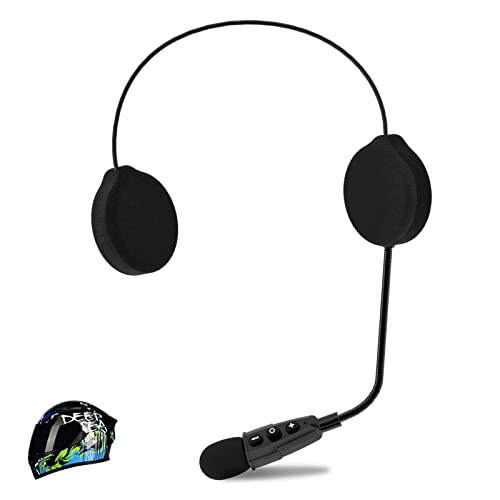
- Helmet headset
- What does a pitch calling app actually do?
- What do you need to set up a pitch calling app?
- Step 1: Install the app and add your pitchers
- Step 2: Set each pitcher's arsenal and your call vocabulary
- Step 3: Mount the headset inside the catcher's helmet
- Step 4: Pair the headset to the coach's phone
- Step 5: Agree on the catcher's relay sign
- Step 6: Run one practice bullpen
- Step 7: Build a game-day routine
- What are the most common pitch calling app setup mistakes?
- What should a good pitch calling app do?
- Does a pitch calling app work for softball?
- Should you use an app or a hardware kit?
- FAQ
Key takeaways
- A pitch calling app lets a coach tap a pitch type and location on a phone; the catcher hears the call spoken in a helmet headset, with no hand signs and no wristband lookup.
- What you need: the app, the coach's phone, one motorcycle-style helmet-mount headset (~$13), ideally a second for the backup helmet, and your league's OK.
- Setup is seven steps and about 20 minutes: install, set arsenals, mount the headset, pair, agree the relay sign, run a bullpen, build a game-day routine.
- The pitcher wears nothing. The catcher hears the call and gives one simple sign.
- Look for spoken calls, offline operation and per-pitcher arsenals. Our apps compared guide has the full checklist.
- It works the same for fastpitch, with rise, drop, screwball and the rest of the softball menu.
A pitch calling app is software on the coach's phone that sends the pitch call to the catcher as a spoken phrase through a Bluetooth headset in the helmet. Instead of a laminated wristband or finger signs, the coach taps "curveball" and "low and away," and the catcher hears "Curveball, low and away" in about a second. No signs to steal, no catcher squinting at a wrist, and the pitch is logged automatically.
This page is the setup guide: everything you need and the seven steps to go from download to a smooth first game. We build MAVTRAX, a free pitch calling app for iPhone, Android and the web, so the steps use it as the example; most of them apply to any audio-based app. If you are still deciding which kind of app you want, read pitch-calling apps compared first. If you want to know exactly what the free app includes, that is the free pitch calling app. And for how this fits among all the electronic options, see the electronic pitch-calling systems hub.
What does a pitch calling app actually do?
The flow is simple, and that is the point:
- The coach taps a pitch on the phone: the type (fastball, curve, changeup and so on) and the location (in, away, up, down).
- The app speaks the call through a Bluetooth headset inside the catcher's helmet: "Fastball, up and in."
- The catcher relays one simple sign to the pitcher and sets up in the called spot.
- The app logs the pitch by pitcher, type and location, so you have a pitch log without a clipboard.
No visible signs means nothing for a runner on second to steal. No wristband means the catcher's eyes never leave the field. And because MAVTRAX stores its audio on the phone, the call fires with no cell signal at all once the app has been opened with signal.
What do you need to set up a pitch calling app?
| Item | Why | Cost |
|---|---|---|
| The app | The transmitter: pitch menu, voice calls, log | MAVTRAX is free |
| The coach's phone | Runs the app; iPhone, Android or a browser with Bluetooth | Already owned |
| Helmet-mount headset | The receiver: a speaker pod inside the catcher's ear flap | ~$13 |
| Second headset | Wires the backup helmet so a swap never takes calls offline | ~$13 |
| Power bank | Keeps the phone alive through a tournament day | Optional |
| Your league's OK | Electronic devices are not permitted everywhere | One email |
The headset is the one purchase. The type that works is a motorcycle-style helmet-mount Bluetooth headset, not earbuds: its thin, flat speaker pods are built to velcro inside a helmet, so the audio rides with the catcher's helmet through every pop-up. Our top pick is the ELIKIDSTO IPX7 helmet headset at about $13, rated around 50 hours per charge. Buy two. The full ranked list is in best Bluetooth headsets for a catcher's helmet.
Step 1: Install the app and add your pitchers
Get MAVTRAX from the App Store or Google Play, or open the web app in a browser. There is no card to enter and nothing to unlock. Create the account on the phone the head coach will actually call from during games.
Add your pitchers first, even if it is just one for the backyard test. You can add the rest of the staff later. If two coaches share calling duty, decide before the game whose phone the catcher's headset is paired to, and keep it that way for the whole game so nobody fights the Bluetooth menu mid-inning.
Step 2: Set each pitcher's arsenal and your call vocabulary
For each pitcher, turn on only the pitches they actually throw. This is the setting that saves you in the sixth inning: the menu never offers a slider to a kid who does not have one. Our pitch types by age chart is a sensible guide for what belongs in each age group's arsenal.
Then agree on how locations are named. Most staffs use a nine-zone grid: up, middle or down, crossed with in, middle or away. The catcher should hear exactly the same words every time. Pitch locations explained has the full vocabulary if you want to teach it. Pick a voice and speed you like in the settings, then leave them alone for the season so the calls always sound the same.
Step 3: Mount the headset inside the catcher's helmet
This step is what makes an app system feel professional. The catcher's helmet comes off on every pop-up, mound visit and play at the plate, so the speaker has to be part of the helmet, not the player.
- Charge the headset fully.
- Peel the velcro backing and stick one speaker pod inside one ear flap, centered over the ear hole.
- Tuck the thin wire behind the padding so nothing snags.
- Mount the small control unit low on the shell where the mask and straps do not press it.
- Leave the other ear open for the umpire, the pitcher and the field.
The full walkthrough with placement tips is in how to install a Bluetooth headset in a catcher's helmet. If you have not bought the headset yet, the ~$13 ELIKIDSTO helmet-mount unit is the one we recommend first; wire the backup helmet with a second one while you are at it. Have the catcher put on the full gear, mask included, and confirm nothing presses.
Step 4: Pair the headset to the coach's phone
Pair at home, not at the field. Turn off other Bluetooth devices nearby, hold the headset's power button until it announces pairing, and connect it in the phone's Bluetooth settings like any headphones. Then:
- Rename it in the phone's Bluetooth menu ("CATCHER 1", "CATCHER 2") so you know which helmet is live.
- Set the volume on the headset, not only the phone, so it stays put between games.
- Unpair devices you do not need during games (car, spare earbuds) so the phone never grabs the wrong one.
Open the app and call a test pitch. The catcher should hear it in about a second. If you are curious why range and placement matter so much at the field, wireless pitch calling explains Bluetooth range and interference.
Step 5: Agree on the catcher's relay sign
In the one-way setup the pitcher wears nothing, so the catcher passes the pitch type along with one simple sign and sets up in the called location. Keep it to one sign: one finger for fastball, two for curve, and so on. The location needs no sign because the glove shows it.
Because the sequence and the location never cross the field, there is little left for the other dugout to steal. You can still rotate the meaning of the sign between innings if an opponent is watching closely. Catcher signs and signals is the primer for young catchers, and coach-to-catcher communication devices covers the relay in the context of device choice.
Step 6: Run one practice bullpen
Never debut the app in a game. One bullpen of about fifty pitches makes the whole flow automatic:
- The coach stands where they will call from in games, not next to the catcher.
- The catcher says the first ten calls back out loud, then switches to a nod.
- The coach finds a tapping rhythm: call the next pitch as soon as the catcher gets the ball back.
- Try Live Talk once (press and hold to speak live) so the catcher knows what it sounds like.
If the catcher hears every call clearly over practice noise from your game-day spot, you are ready.
Step 7: Build a game-day routine
Night before: charge both headsets and the coach's phone; pack a power bank.
Before warmups end: call three pitches from the exact spot you will call from. On a new field, run a quick range test from the dugout opening and from the back bench.
At the plate meeting: tell the umpire and the opposing coach, in one sentence, that you use a one-way device from coach to catcher and the pitcher wears nothing.
During the game: phone in hand at the dugout opening, not in a pocket. If a headset drops, toggle Bluetooth off and on between batters; if it will not reconnect, swap helmets at the next dead ball; if both fail, finish the inning on your old signs. Keep those signs all season.
After the game: glance at the pitch log. Pitch mix and location by pitcher are the start of a good conversation with your catcher, and the count helps you stay inside your league's pitch count rules.
What are the most common pitch calling app setup mistakes?
Almost every first-week problem coaches report traces back to one of these, and every one has a quick fix.
- Using earbuds. They fall out on the first pop-up and never sit right under a mask. Fix: a helmet-mount headset whose pod lives inside the ear flap.
- Pairing at the field. A crowded complex full of phones makes pairing slow and confusing. Fix: pair at home, rename the headset, and never leave it in pairing mode at the park.
- Calling from the back bench. Distance, bodies and a wall between the phone and the plate cause dropouts. Fix: stand at the dugout opening with the phone in hand.
- Leaving every pitch turned on. The menu offers pitches a kid does not throw, and a tired coach taps one. Fix: set each pitcher's arsenal in Step 2.
- Only one headset. A cracked helmet or dead battery ends electronic calling for the day. Fix: wire the backup helmet with a second ~$13 headset.
- Skipping the plate-meeting mention. An umpire who spots a headset mid-inning will stop play to ask. Fix: one sentence before the first pitch.
What should a good pitch calling app do?
Not every app that "calls pitches" is built for game day. The five things that matter most:
- Spoken audio, not a screen to read. If the catcher has to look at a display, you have reintroduced the visual break you were trying to remove.
- Fast calls. Pre-loaded audio that fires in about a second, not a stream that buffers.
- Works offline. Tournament back fields have no signal; the calling path cannot depend on it.
- Pitch type and location, with per-pitcher arsenals. A number off a card is crude; the real pitch and spot is the job.
- Honest pricing. No trial that flips into a charge. MAVTRAX is free with no paid tier at all.
The full comparison of app categories (audio apps, screen and watch apps, card generators, charting apps) and a pre-download checklist is in pitch-calling apps compared.
Does a pitch calling app work for softball?
Yes, and fastpitch is one of the best fits. The same flow lets a coach call rise, drop, curve, screwball, changeup and a location straight to the catcher without flashing signs that a base coach can read. Fastpitch moves quickly, so the speed of a spoken call matters even more, and the same helmet-mount headset works in a softball catcher's helmet.
More on the fastpitch setup and rules: softball pitch calling systems and electronic pitch calling for softball.
Should you use an app or a hardware kit?
For most youth, travel, high-school and fastpitch teams, the app: it runs on the phone you already own, the only purchase is a ~$13 headset, and a lost headset is a $13 problem. A dedicated hardware kit (about $999 for a starter as of August 2026) makes more sense for programs that do not allow a phone on the bench or want the pitcher on audio too.
The full head to head on setup, range, batteries, rules and where each wins is pitch calling app vs. hardware kit, and every price is on pitch-calling system cost.
FAQ
What is a pitch calling app?
Software on the coach's phone that sends the pitch call to the catcher as a spoken phrase through a Bluetooth headset in the helmet. The coach taps a pitch and a location, and the catcher hears the call in about a second, with no signs for the other team to steal.
How do you set up a pitch calling app?
Install the app and add your pitchers, set each pitcher's arsenal and your location names, velcro a helmet-mount Bluetooth headset inside the catcher's ear flap, pair it to the coach's phone, agree on one relay sign, run one practice bullpen, then build a charge-test-announce game-day routine. It takes about 20 minutes the first time.
What headset works with a pitch calling app?
A motorcycle-style helmet-mount Bluetooth headset whose thin speaker pod velcroes inside the catcher's helmet ear flap. Our top pick is about $13 and rated around 50 hours per charge. Earbuds fall out when the catcher rips the helmet off, so we do not recommend them.
Is there a free pitch calling app?
Yes. MAVTRAX is free on iPhone, Android and the web with no subscription, no trial and no in-app purchases. The only purchase is a helmet headset for the catcher.
Does a pitch calling app need cell service at the field?
Not if it stores its audio on the phone. Open MAVTRAX once with signal and it calls pitches with zero bars after that, because the link to the headset is Bluetooth, not the internet.
Does the pitcher need a headset?
No. In the setup most leagues allow, only the catcher hears the call and relays it with one simple sign. Where the pitcher is allowed (USA Softball now, NFHS high school from 2027), MAVTRAX's free pitcher speaker plays the same call into a second headset from a second phone in the dugout.
Is there a softball pitch calling app?
Yes. The same apps work for fastpitch; MAVTRAX includes the softball pitch menu (rise, drop, screwball and more), and the same helmet-mount headset fits a softball catcher's helmet.
We're the team behind MAVTRAX, a free pitch-calling app. This is a research guide: picks are chosen on manufacturer specs, league rules, build quality and real-world price, checked against live listings, not on who pays the highest commission. We haven't hands-on tested every product. Full criteria on how we pick.
The headset that makes it work
Every setup above ends in the catcher's helmet. These are the helmet-mount units we recommend, from our headset guide (install in 5 minutes: how-to). Live price on Amazon.