Pitch Calling Apps Compared (2026): The 5 Kinds of App, and What to Check Before You Download
Apps sold as pitch calling apps do five very different jobs: some speak the call into the catcher's helmet, some show it on a screen or watch, some just print wristband cards, some chart pitches without calling them, and some are generic push-to-talk apps. Here is what each kind does, how they compare on the things that matter in a game, and a checklist to run before you download any of them.
In this guide · 13 sections
- Gear for this
- What kinds of pitch calling apps are there?
- Audio-call apps: the call spoken into the catcher's helmet
- Screen and smartwatch apps: the call on a display
- Wristband card generators: apps that build sign cards
- Pitch charting apps: they log pitches but do not call them
- Push-to-talk apps: why generic walkie-talkie apps are a poor fit
- How do pitch calling apps compare side by side?
- What should you check before downloading a pitch calling app?
- Which headset works with an audio pitch calling app?
- Where does MAVTRAX fit, honestly?
- Pitch calling app or hardware kit?
- FAQ
Key takeaways
- Five kinds of pitch calling app: audio-call apps, screen and smartwatch apps, wristband card generators, pitch charting apps, and generic push-to-talk apps.
- Only audio-call apps keep the catcher's eyes on the field; screen and card apps still need a glance on every pitch.
- Charting apps log pitches but do not call them. Useful, but a different job.
- Push-to-talk apps are a poor fit: many need a data connection, they are two-way, and nothing is preset.
- Before downloading, check: pricing model (trial that flips to a charge?), offline operation, speed, per-pitcher arsenals, one-way design and platform support.
- MAVTRAX is an audio-call app: free, one-way coach to catcher, offline once loaded, paired with a ~$13 helmet-mount headset.
"Pitch calling app" covers five different kinds of software, and they are not interchangeable. Some speak the call into a headset in the catcher's helmet. Some show it on a phone, tablet or smartwatch screen. Some only build and print wristband sign cards. Some chart pitches for stats but never send a call. And some are general walkie-talkie apps that coaches repurpose. Which one you want depends on your rules, your budget and whether you want the catcher's eyes to leave the field.
This guide compares the five kinds honestly, in generic terms. We do not name or rate other companies' apps, because features and prices change and we would rather not publish claims we cannot verify. We do build one of these apps, MAVTRAX, which is an audio-call app; where that bias matters, we say so. For how to set one up once you have chosen, see how to set up a pitch calling app; for where apps sit among all electronic systems, see the electronic pitch-calling systems hub.
The headset that makes it work
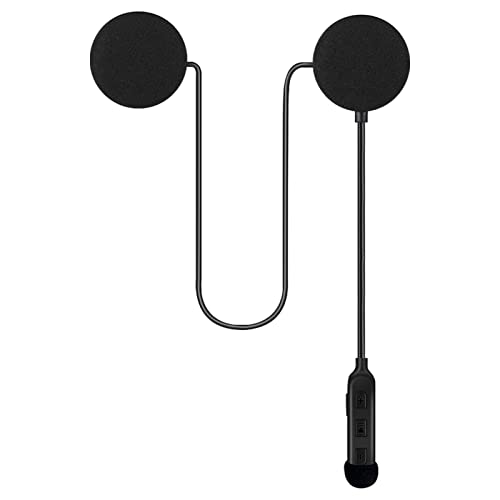
Every setup above ends in the catcher's helmet. These are the helmet-mount units we recommend, from our headset guide (install in 5 minutes: how-to). Live price on Amazon.



What kinds of pitch calling apps are there?
| App kind | What it does | What the catcher does | Extra hardware |
|---|---|---|---|
| 1. Audio-call app | Speaks the pitch and location to a Bluetooth headset | Listens; eyes stay on the field | A helmet-mount headset |
| 2. Screen or watch app | Shows the call on a phone, tablet or smartwatch display | Glances at a screen each pitch | A watch or wrist-mounted device |
| 3. Card generator | Builds coded wristband cards for you to print | Reads a number, looks it up on the wrist | A wristband and printer |
| 4. Charting / scoring app | Logs pitches for stats; does not send calls | Nothing different | None |
| 5. Push-to-talk app | Generic walkie-talkie over data or Bluetooth | Listens to live voice | Headset; often a data connection |
The first three actually move a pitch call. The fourth measures what happened. The fifth can move a call, but it was not built for one. The sections below take each in turn.
Audio-call apps: the call spoken into the catcher's helmet
An audio-call app turns the coach's phone into a transmitter. The coach taps a pitch and a location; the app plays a spoken call ("Slider, down and in") through a Bluetooth headset inside the catcher's helmet. The catcher relays to the pitcher with one simple sign.
Strengths: the catcher never looks away from the hitter; the call is private and fast; the only hardware is a headset; and because every call goes through the app, a pitch log comes for free. Well-built audio apps store their calls on the phone, so they work with no signal.
Weaknesses: a phone has to be in the coach's hand, which some staffs do not allow; one phone typically drives one headset connection, so it is a catcher-only system rather than a whole-team one; and like every electronic option, it needs your league's permission.
This is the category MAVTRAX is in, and it is the one we think fits most youth, travel, high-school and fastpitch teams, for the eyes-on-the-field reason above.
Screen and smartwatch apps: the call on a display
Screen apps send the call to a display instead of an ear: a smartwatch on the catcher's wrist, a phone in a wrist sleeve, or a tablet. They are the software cousin of the wrist-display hardware systems common in fastpitch.
Strengths: silent, so crowd noise is irrelevant; several players can sometimes see the same call; and there is nothing inside the helmet.
Weaknesses: the catcher still has to look on every pitch, which is the exact habit electronic calling is supposed to remove; screens are hard to read in bright sun; watches and wrist devices take hits behind the plate; and some rulebooks treat wearable screens differently from one-way audio. If you are weighing a watch against an app, pitch calling watch vs. app goes deeper.
Wristband card generators: apps that build sign cards
Card generators do not call pitches during the game at all. They help you build a coded grid (number to pitch and location), randomize it and print it for wristbands. In the game, the coach flashes or calls a number and the catcher looks it up.
Strengths: allowed almost everywhere, since nothing electronic is used in play; cheap; no batteries.
Weaknesses: the catcher's eyes leave the field on every pitch, it is slower than a spoken call, and a sharp opposing staff can decode a card over a few innings unless you rotate cards often. How to prevent sign stealing explains how that decoding happens. If your league bans electronics, this is the right kind of app; if it does not, an audio app removes both weaknesses.
Pitch charting apps: they log pitches but do not call them
Charting and scoring apps record what happened: pitch type, result, velocity if you enter it, pitch counts. They are valuable for development and for workload, and many teams already run one for the scorebook.
They are not pitch calling apps, though they sometimes show up in the same searches. Nothing is sent to the catcher. If what you want is both, an audio-call app that logs every call gives you a pitch log as a side effect of calling, without a second person charting. Either way, keep an honest eye on your league's pitch count rules.
Push-to-talk apps: why generic walkie-talkie apps are a poor fit
Some coaches try a general walkie-talkie app with an earpiece. It can work in a pinch, but it fails on the details that matter in a game:
- Many need a data connection, and tournament back fields often have none.
- They are two-way by design, which is not the configuration most leagues permit.
- Nothing is preset, so the coach is talking out loud in the dugout, where the other team can hear.
- No log of what was called.
Live voice is genuinely useful for things a pitch menu cannot say, which is why MAVTRAX includes Live Talk (press and hold to speak through the same headset) alongside its preset calls. As the whole system, though, push-to-talk is the wrong tool.
How do pitch calling apps compare side by side?
| Audio-call | Screen / watch | Card generator | Charting | Push-to-talk | |
|---|---|---|---|---|---|
| Sends a call in-game | Yes | Yes | No (card only) | No | Yes (live voice) |
| Catcher's eyes stay on field | Yes | No | No | n/a | Yes |
| Works with no signal | If audio is stored on the phone | Depends on the app | Yes | Usually | Often no |
| One-way by design | Usually | Usually | Yes | n/a | No |
| Logs pitches | Often | Sometimes | No | Yes | No |
| Extra hardware | Helmet headset (~$13) | Watch or wrist device | Wristband, printer | None | Headset |
| Rules exposure | Electronic, one-way | Electronic, wearable | Lowest | None in play | Two-way, highest |
Pricing is the one row we leave out, because it varies by app and changes often: some are free, some charge once, some run subscriptions, and some start with a trial that becomes a charge. Check the current price in the app store listing before you commit a season to one.
What should you check before downloading a pitch calling app?
- The real price. Read the listing for trials, subscriptions and in-app purchases. A trial that flips to a charge mid-season is a common surprise. (MAVTRAX has no price at all.)
- Offline operation. Put the phone in airplane mode with Bluetooth on and call a pitch. If it fails, it will fail on a back field.
- Speed. The call should land in about a second. Anything that streams or buffers is too slow.
- Per-pitcher arsenals. You should never be able to call a pitch a kid does not throw.
- One-way design. Coach to catcher, pitcher wears nothing: the configuration you will most likely be permitted.
- Platforms. iPhone, Android, web? Make sure every coach who might call can run it.
- Softball support, if you coach fastpitch: rise, drop, screwball and a softball location grid.
- Data. Your roster and pitch log should stay with you. Read the privacy policy.
Which headset works with an audio pitch calling app?
A motorcycle-style helmet-mount Bluetooth headset, the kind riders velcro inside a helmet. Its thin speaker pod sticks inside the catcher's ear flap, so it rides with the helmet through every pop-up instead of falling out like an earbud. Any audio-call app that plays through standard Bluetooth will work with it.
Our top pick is the ELIKIDSTO IPX7 helmet-mount headset at about $13, rated around 50 hours per charge; buy two and wire the backup helmet too. It installs in about a minute with how to install a Bluetooth headset in a catcher's helmet. Step-up units with slimmer pods or brand-name pairing are ranked in best Bluetooth headsets for a catcher's helmet.
Where does MAVTRAX fit, honestly?
MAVTRAX is an audio-call app: free on iPhone, Android and the web, with no subscription, no trial and no in-app purchases. The coach taps pitch and location, the catcher hears the spoken call in about a second, Live Talk handles anything the menu cannot say, it runs offline once loaded, and every call lands in a pitch log. Details are on the free pitch calling app page.
Its limits are the limits of the category: it needs a phone on the bench, it is built for a coach calling to the catcher (not a catcher calling to the pitcher), and it puts one catcher on the call rather than the whole defense. If any of those is a dealbreaker, a screen app or a hardware system may suit you better.
Pitch calling app or hardware kit?
If you are comparing apps, you have probably already ruled out a dedicated hardware kit on price (about $999 for a starter as of August 2026; every price is on pitch-calling system cost). If you have not, the direct comparison of setup, range, batteries, rules and where each wins is pitch calling app vs. hardware kit. Hardware is the better choice for programs that ban phones on the bench or want the pitcher on audio; an app is the better choice for almost everyone else.
FAQ
What are the different kinds of pitch calling apps?
Five: audio-call apps that speak the call into a helmet headset, screen and smartwatch apps that show it on a display, wristband card generators that build printable sign cards, charting apps that log pitches without calling them, and generic push-to-talk apps.
What is the best kind of pitch calling app?
For most teams, an audio-call app, because it is the only kind that keeps the catcher's eyes on the field while delivering a private call. Card generators are the best choice where electronics are banned, and screen apps suit teams that want several players to see the call.
Are there pitch calling apps that work without cell service?
Yes, if the app stores its audio on the phone and talks to the headset over Bluetooth. Test any app in airplane mode with Bluetooth on before you rely on it at a tournament.
Can I use a walkie-talkie app to call pitches?
It can work in a pinch, but many need a data connection, they are two-way (not the configuration most leagues allow), and the coach has to speak out loud. A purpose-built audio-call app with preset calls is a better fit.
Do pitch calling apps cost money?
It varies by app: some are free, some charge once, some are subscriptions and some start with a trial. MAVTRAX is completely free with no trial or in-app purchases. Always check the current listing before you commit.
What headset do I need for a pitch calling app?
A motorcycle-style helmet-mount Bluetooth headset whose thin pod velcroes inside the catcher's helmet ear flap. Our top pick is about $13; it works with any audio app that plays through standard Bluetooth.
Is a pitch charting app the same as a pitch calling app?
No. A charting app records pitches for stats and pitch counts; a pitch calling app sends the call to the catcher. Some audio-call apps log every call they send, which gives you a basic pitch log as a by-product.
We're the team behind MAVTRAX, a free pitch-calling app. This is a research guide: picks are chosen on manufacturer specs, league rules, build quality and real-world price, checked against live listings, not on who pays the highest commission. We haven't hands-on tested every product. Full criteria on how we pick.