The Best GameChanger Streaming Setup (2026): 9 Pieces of Gear That Keep the Stream Alive
Every travel team streams on GameChanger now, and every team learns the same four failure modes: the shaky fence angle, the phone that overheats in the fifth inning, the battery that dies in the third, and the stream that buffers into oblivion. This is the gear that fixes all four, tested across a full season of tournament streams.
In this guide · 7 sections
Quick picks
Our top recommendations, full reviews below.
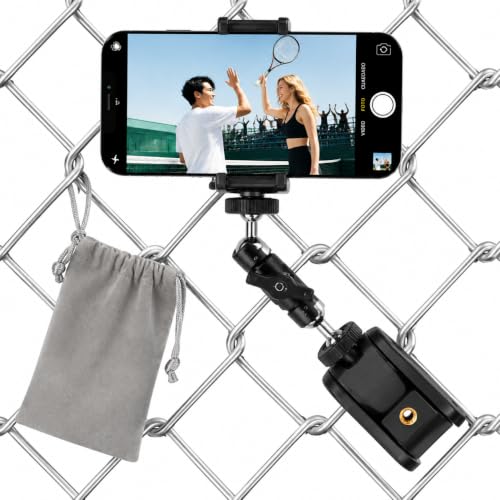
THE GameChanger angle, clamped behind the plate
~$16 price and availability on Amazon
View on Amazon →Key takeaways
- GameChanger streams come from a phone, so GC streaming gear is really phone-support gear: a stable mount, endless power, heat control, and a data plan that survives video.
- The standard angle is behind the backstop, centered, facing the field, a $17 fence mount or a tall tripod gets it; everything handheld gets abandoned by inning two.
- Heat is the #1 mid-game stream killer: a phone streaming video in direct July sun will overheat and shut the camera down, shade the phone and clip on a $12 cooling fan.
- Streaming is the fastest battery drain a phone can do. The rig runs plugged in, always: power bank + 10-foot cable as the default, car charger for between-games recovery.
- The veteran move: a retired old phone as the dedicated GameChanger camera, logged into the team, mounted all day, hotspotted from your pocket. Your actual phone stays yours.
- The whole kit is about $80 on top of gear you may already own, and it's the difference between 'the stream died again' and grandparents watching every pitch.
GameChanger turned every youth team into a broadcast network, scorekeeping and live video in the same app the whole family already uses. What it didn't ship was the hardware reality: a phone streaming video for two hours in the sun is a device being tortured, and the stream dies the four same ways every weekend, bad mount, dead battery, thermal shutdown, or data collapse.
We know this problem embarrassingly well: we build MAVTRAX (pitch calling that runs beside GC in hundreds of dugouts), and we've spent seasons watching, and fixing, tournament streaming rigs. The kit below solves all four failure modes for about $80 of accessories plus the mounts you may already own from our general livestreaming guide. One note up front: GameChanger's app features evolve, this page is about the hardware, which stays true regardless of what the app version looks like this month.
At a glance
| Pick | Best for | Price* | ||
|---|---|---|---|---|
| Backstop Fence Mount | THE GameChanger angle, clamped behind the plate | ~$16 | View → |
 | 72" Phone Tripod | Fields where the backstop doesn't cooperate | ~$24 | View → |
 | SYNCWIRE Universal Phone Mount | The clamp that fits every phone, case on | ~$10 | View → |
 | 20,000mAh Power Bank (22.5W) | Streaming without it is a countdown timer | ~$27 | View → |
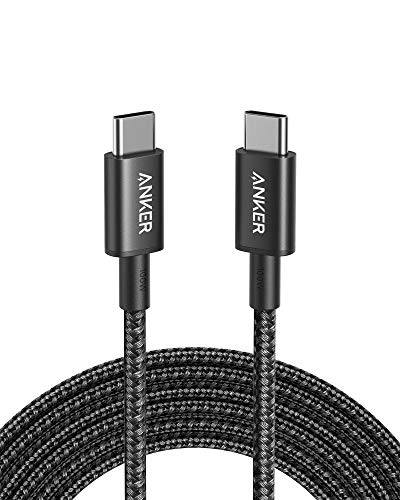 | Anker USB-C Cable, 10ft | The reach from the ground to the mounted phone | ~$10 | View → |
 | Semiconductor Phone Cooling Fan | The July fix nobody knows about, thermal shutdowns | ~$18 | View → |
 | AINOPE 45W Car Charger | Between-games recovery for the whole rig | ~$10 | View → |
 | Hiearcool Waterproof Phone Pouch (IPX8) | Rain delays, dust storms, and Gatorade celebrations | ~$10 | View → |
 | Mevo Start Streaming Camera | When you outgrow phone streaming entirely | ~$430 | View → |
*Prices at time of writing, they move; check the listing.
Backstop Fence Mount
~$16
The canonical GC shot is centered behind the backstop, slightly elevated, facing the field, the angle where balls, strikes, and every play read clearly on a phone screen. A chain-link fence mount clamps the phone exactly there in thirty seconds, holds it all game, and costs seventeen dollars. This is the first purchase of every serious GC streamer.
- The correct angle, permanently
- 30-second install on any chain-link
- Frees every parent from tripod duty
- Fence vibration on windy days (tighten it)
- Backstop position varies by complex
72" Phone Tripod
~$24
Not every backstop wants your mount, some are brick, some are too far, some tournaments restrict fence attachments. The tall tripod is the answer: 72 inches gets the lens above heads and fences, plants anywhere along the spectator line, and doubles for the swing-film work the same phone does at practice.
Weight the center hook (a gear bag works) on breezy days, a six-foot tripod with a phone up top is a sail. If your complex has notorious wind, this plus the fence mount covers every field you'll meet.
- Works at every field, every rule set
- Height clears fences and foreheads
- Doubles as the practice film rig
- Wind wants it, weight the hook
- One more thing in the wagon
SYNCWIRE Universal Phone Mount
~$10
The unglamorous truth of phone streaming: half the mid-game failures are the phone slowly sagging in a worn-out clamp. A quality universal mount grips a cased phone tight, threads onto any standard tripod or fence mount, and holds the frame you set in inning one through inning six. Buy two, one lives on the fence mount, one on the tripod, and nobody re-rigs anything between fields.
- Fits phones WITH cases
- Standard thread, works on both mounts
- Cheap enough to buy per-mount
- Cheap clamps sag, this is why brand matters at $10
- Check tightness at inning changes
20,000mAh Power Bank (22.5W)
~$27
Live video is the most power-hungry thing a phone does, camera, encoder, radio, and screen all running flat-out. A phone that starts at 100% will not finish a doubleheader unassisted; in summer sun it may not finish game one. The 20,000mAh bank is the fix: the streaming phone runs plugged in from first pitch, not rescued at 15%.
This is the same bank from the tournament kit, but streaming families should strongly consider a second, dedicated one. The family bank has a way of wandering off with a sibling's tablet right as the bracket final starts.
- Runs the stream plugged in, all day
- Multiple full recharges in the tank
- Also the scorekeeper's lifeline
- Streaming rigs deserve their OWN bank
- Charge it Friday (it counts too)
Anker USB-C Cable, 10ft
~$10
The detail every first-time streamer misses: the phone is six feet up a fence and the power bank is on the ground. A standard three-foot cable means the bank dangles by its cord (RIP port) or the phone streams unplugged (RIP stream). A braided 10-footer runs fence-to-ground with slack, survives being stepped on, and costs ten bucks from a brand whose cables actually last seasons.
- Reaches mounted-phone to grounded-bank
- Braided, survives cleats and gates
- Anker build quality at commodity price
- Ten feet of cable wants a velcro tie
- Buy the 2-pack; one always migrates
Semiconductor Phone Cooling Fan
~$18
The most mysterious GC failure demystified: the stream that dies mid-inning on a hot day with battery remaining is a thermal shutdown, phones protect themselves by killing the camera when they cook, and streaming in direct sun is the perfect recipe. A clip-on semiconductor cooler is an actively-chilled plate against the phone's back, and it's the difference between streaming a July doubleheader and streaming the first four innings of one.
- Directly prevents the #1 summer stream death
- Clips on, powered by the same bank
- $12 against a season of dead streams
- One more USB draw (the bank covers it)
- Magnetic versions need MagSafe-style phones, this clips
AINOPE 45W Car Charger
~$10
The between-games window is when the rig recovers: fast-charge the streaming phone and top the power bank on the drive to lunch or in the AC break. A 45W dual-port unit refills a phone meaningfully in twenty minutes, the difference between starting the bracket game at 90% or at 40% with a prayer.
- Fast-charges phone AND bank together
- Lives in the car permanently
- Completes the all-day power loop
- Only helps if you actually go to the car
- Cheap car chargers lie about watts, this doesn't
Hiearcool Waterproof Phone Pouch (IPX8)
~$10
Tournament weather is chaos: the drizzle that doesn't stop play, the dust the wind lifts off the infield, the cooler that gets celebrated onto the sideline table. A touchscreen-friendly IPX8 pouch keeps the stream running through mist and grit, the camera shoots fine through the clear window, and stashes flat in the rig bag the other 95% of days.
- Stream survives drizzle and dust
- Touchscreen + camera work through it
- Flat, weightless insurance
- Slight glare, angle the window down
- Not for full downpours (nothing is; go home)
Mevo Start Streaming Camera
~$430
The honest ceiling: GameChanger streams from a phone, and everything above solves phone problems. If your program's streaming ambitions grow past that, multi-platform broadcasts to YouTube/Facebook, sponsor overlays, a camera that isn't also somebody's phone, the Mevo Start is the dedicated-hardware step, covered fully in our general livestreaming guide.
Our advice hasn't changed: run the phone rig for a full season first. If the family audience is real and growing, graduate; if GC's built-in stream serves everyone who actually watches, you just saved $430.
- True broadcast rig, wireless, app-run
- Frees the phone completely
- The path to sponsored streams
- A different pipeline than GC's in-app stream
- Validate the audience before spending
The four ways GameChanger streams die (and the fix for each)
A season of tournament streams fails in exactly four ways. The diagnostic table:
| The death | The symptom | The fix |
|---|---|---|
| The mount death | Shaky, sagging, or handheld-abandoned by inning 2 | Fence mount (or tall tripod) + a real phone clamp |
| The thermal death | Stream stops mid-inning, battery fine, phone HOT | Cooling fan + shade the phone, the July classic |
| The battery death | Dead by game two despite a full morning charge | Streamed plugged in: bank + 10ft cable, car charger between games |
| The data death | Buffering, quality drops, "stream ended" on full bars | Complex wifi if real; otherwise a hotspot plan with actual headroom, video eats several GB a game |
Notice what's NOT on the list: the app. GC's streaming works, it's the phone's physics that fail. Solve the physics and the stream survives the season.
The veteran move: the dedicated old-phone rig
The best GameChanger streaming hardware might already be in your junk drawer. The setup serious streaming families run:
- Resurrect a retired phone (2 to 4 years old is plenty, it only needs a decent camera and the GC app), factory-fresh it, install GameChanger, log into the team.
- It becomes the permanent rig phone: lives clamped to the fence mount, powered by the rig's dedicated bank, cooled by the fan, configured once, never fiddled with.
- Data comes from your pocket: hotspot from your actual phone (or the complex wifi when it's real). Your daily phone stays in your hand for brackets, photos, and life.
- The whole family wins: nobody's personal phone is imprisoned on a fence for six hours, the rig's settings never get disturbed, and a foul ball into the rig costs a retired device, not your daily driver.
Total cost if the drawer phone exists: $0 plus the accessories above. It's the single highest-leverage tip on this page.
The 5-minute rig routine (game day)
- At the field, minus-15: clamp the mount behind the backstop, center on the plate, one foot higher than instinct says.
- Power first, always: bank connected via the 10-footer BEFORE the stream starts, plugging in mid-game means touching the framing.
- Heat check: cooler clipped on sunny days; confirm the phone sits in shade or under its cardboard visor.
- Start the stream in the GC app, lock the phone's rotation, and walk away. The best rig is the one nobody touches until the handshake line.
- Between games: phone + bank to the car charger, quick lens wipe (dust film is real), re-clamp at the next field. The tournament survival guide's timeline has the full day.
And the play worth filming well: if your team runs electronic pitch calling, the stream never shows a sign to steal, grandma sees the game, opponents see nothing. (One more reason the sign-stealing arms race is ending.)
Data math and the recruiting bonus
The data reality: live video consumes several gigabytes per game, a four-game Saturday can eat a phone plan's entire monthly allotment. Before the season: check whether your plan throttles hotspot data separately (most do), whether the complex's wifi is real or decorative (test it BEFORE relying on it), and whether an unlimited-hotspot line for the rig phone is cheaper than the overage you're about to meet. Streaming families burn more money on surprise data than on all the gear on this page.
The bonus nobody plans for: a season of well-mounted GC streams is a recruiting archive. The centered backstop angle is exactly the view coaches and recruiters want, and clipping highlights from consistent, stable footage beats begging relatives for shaky sideline video when recruiting season arrives. Save the good games locally, the film workflow section of our streaming guide covers the clip pipeline.
FAQ
What do I need to stream games on GameChanger?
The GC app streams from a phone, so the kit is phone support: a backstop fence mount or tall tripod with a quality phone clamp (~$30 combined), a power bank with a 10-foot cable so the phone streams plugged in (~$30), a clip-on cooling fan for hot days (~$12), and a data plan that can absorb several GB per game.
Why does my GameChanger stream keep stopping?
The big three: thermal shutdown (hot phone in direct sun kills the camera, add shade and a cooling fan), battery death (stream plugged into a power bank from first pitch), or data collapse (video eats several GB a game; test the complex wifi and know your hotspot plan's real limits).
What's the best angle to stream a baseball game?
Centered behind the backstop, slightly elevated, facing the field, the angle where pitches, calls, and plays all read clearly. A $17 chain-link fence mount puts a phone exactly there; mount it about a foot higher than feels natural.
Can you keep score and stream on GameChanger at the same time?
The reliable setup is two devices: one phone mounted and streaming, another (the scorekeeper's) doing the book. Workflows vary as the app evolves, but a dedicated streaming phone, ideally a retired old phone logged into the team, is the arrangement that survives a full tournament day.
How much data does streaming a baseball game use?
Plan on several gigabytes per game, commonly 2 to 4GB+ depending on quality and length, which means a four-game Saturday can consume an entire month's hotspot allowance. Check your plan's hotspot throttling rules before the season, not after the overage text.
Do I need a Mevo or special camera for GameChanger?
No, GameChanger streams from the phone's camera through the app. Dedicated cameras like the Mevo Start serve a different pipeline (YouTube/Facebook broadcasts) for programs that outgrow in-app streaming. Run the phone rig for a season first; most families never need more.
We're the team behind MAVTRAX, a free pitch-calling app. This is a research guide: picks are chosen on manufacturer specs, league rules, build quality and real-world price, checked against live listings, not on who pays the highest commission. We haven't hands-on tested every product. Full criteria on how we pick.